mirror of
https://github.com/larksuite/cli.git
synced 2026-07-03 14:02:43 +08:00

294 lines
16 KiB
Markdown
294 lines
16 KiB
Markdown
# lark-cli
|
|
|
|
[](https://opensource.org/licenses/MIT)
|
|
[](https://go.dev/)
|
|
[](https://www.npmjs.com/package/@larksuite/cli)
|
|
|
|
[中文版](./README.zh.md) | [English](./README.md)
|
|
|
|
The official [Lark/Feishu](https://www.larksuite.com/) CLI tool, maintained by the [larksuite](https://github.com/larksuite) team — built for humans and AI Agents. Covers core business domains including Messenger, Docs, Base, Sheets, Slides, Calendar, Mail, Tasks, Meetings, Markdown, and more, with 200+ commands and 26 AI Agent [Skills](./skills/).
|
|
|
|
[Install](#installation--quick-start) · [AI Agent Skills](#agent-skills) · [Auth](#authentication) · [Commands](#three-layer-command-system) · [Advanced](#advanced-usage) · [Security](#security--risk-warnings-read-before-use) · [Contributing](#contributing)
|
|
|
|
## Why lark-cli?
|
|
|
|
- **Agent-Native Design** — 24 structured [Skills](./skills/) out of the box, compatible with popular AI tools — Agents can operate Lark with zero extra setup
|
|
- **Wide Coverage** — 18 business domains, 200+ curated commands, 26 AI Agent [Skills](./skills/)
|
|
- **AI-Friendly & Optimized** — Every command is tested with real Agents, featuring concise parameters, smart defaults, and structured output to maximize Agent call success rates
|
|
- **Open Source, Zero Barriers** — MIT license, ready to use, just `npm install`
|
|
- **Up and Running in 3 Minutes** — One-click app creation, interactive login, from install to first API call in just 3 steps
|
|
- **Secure & Controllable** — Input injection protection, terminal output sanitization, OS-native keychain credential storage
|
|
- **Three-Layer Architecture** — Shortcuts (human & AI friendly) → API Commands (platform-synced) → Raw API (full coverage), choose the right granularity
|
|
|
|
## Features
|
|
|
|
| Category | Capabilities |
|
|
| ------------- |-----------------------------------------------------------------------------------------------------------------------------------|
|
|
| 📅 Calendar | View, create and update events, invite attendees, find meeting rooms, RSVP to invitations, check free/busy & time suggestions |
|
|
| 💬 Messenger | Send/reply messages, create and manage group chats, view chat history & threads, search messages, download media |
|
|
| 📄 Docs | Create, read, update, and search documents, read/write media & whiteboards |
|
|
| 📁 Drive | Upload and download files, search docs & wiki, manage comments |
|
|
| 📝 Markdown | Create, fetch, patch, and overwrite Drive-native `.md` files |
|
|
| 📊 Base | Create and manage tables, fields, records, views, dashboards, workflows, forms, roles & permissions, data aggregation & analytics |
|
|
| 📈 Sheets | Create, read, write, append, find, and export spreadsheet data |
|
|
| 🖼️ Slides | Create and manage presentations, read presentation content, and add or remove slides |
|
|
| ✅ Tasks | Create, query, update, and complete tasks; manage task lists, subtasks, comments & reminders |
|
|
| 📚 Wiki | Create and manage knowledge spaces, nodes, and documents |
|
|
| 👤 Contact | Search users by name/email/phone, get user profiles |
|
|
| 📧 Mail | Browse, search, read emails, send, reply, forward, manage drafts, watch new mail |
|
|
| 🎥 Meetings | Search meeting records, query meeting minutes artifacts and recordings |
|
|
| 🕐 Attendance | Query personal attendance check-in records |
|
|
| ✍️ Approval | Query approval tasks, approve/reject/transfer tasks, cancel and CC instances |
|
|
| 🎯 OKR | Query, create, update OKRs; manage objective & key results, alignments, indicators and progress. |
|
|
| 📋 Project | Meegle — manage work items, schedules, and data via the standalone [meegle-cli](https://github.com/larksuite/meegle-cli) (install separately) |
|
|
| 🔗 Apps | Create Spark/Miaoda apps, publish HTML/static sites, run cloud generation, and manage access scope |
|
|
|
|
## Installation & Quick Start
|
|
|
|
### Requirements
|
|
|
|
Before you start, make sure you have:
|
|
|
|
- Node.js (`npm`/`npx`)
|
|
- Go `v1.23`+ and Python 3 (only required for building from source)
|
|
|
|
### Quick Start (Human Users)
|
|
|
|
> **Note for AI assistants:** If you are an AI Agent helping the user with installation, jump directly to [Quick Start (AI Agent)](#quick-start-ai-agent), which contains all the steps you need to complete.
|
|
|
|
#### Install
|
|
|
|
Choose **one** of the following methods:
|
|
|
|
**Option 1 — From npm (recommended):**
|
|
|
|
```bash
|
|
npx @larksuite/cli@latest install
|
|
```
|
|
|
|
**Option 2 — From source:**
|
|
|
|
Requires Go `v1.23`+ and Python 3.
|
|
|
|
```bash
|
|
git clone https://github.com/larksuite/cli.git
|
|
cd cli
|
|
make install
|
|
|
|
# Install CLI SKILL (required)
|
|
npx skills add larksuite/cli -y -g
|
|
```
|
|
|
|
#### Configure & Use
|
|
|
|
```bash
|
|
# 1. Configure app credentials (one-time, interactive guided setup)
|
|
lark-cli config init
|
|
|
|
# 2. Log in (--recommend auto-selects commonly used scopes)
|
|
lark-cli auth login --recommend
|
|
|
|
# 3. Start using
|
|
lark-cli calendar +agenda
|
|
```
|
|
|
|
## Quick Start (AI Agent)
|
|
|
|
> The following steps are for AI Agents. Some steps require the user to complete actions in a browser.
|
|
|
|
**Step 1 — Install**
|
|
|
|
```bash
|
|
npx @larksuite/cli@latest install
|
|
```
|
|
|
|
**Step 2 — Configure app credentials**
|
|
|
|
> Run this command in the background. It will output an authorization URL — extract it and send it to the user. The command exits automatically after the user completes the setup in the browser.
|
|
|
|
```bash
|
|
lark-cli config init --new
|
|
```
|
|
|
|
**Step 3 — Login**
|
|
|
|
> Same as above: run in the background, extract the authorization URL and send it to the user.
|
|
|
|
```bash
|
|
lark-cli auth login --recommend
|
|
```
|
|
|
|
**Step 4 — Verify**
|
|
|
|
```bash
|
|
lark-cli auth status
|
|
```
|
|
|
|
## Agent Skills
|
|
|
|
| Skill | Description |
|
|
| ------------------------------- |----------------------------------------------------------------------------------------------------------------|
|
|
| `lark-shared` | App config, auth login, identity switching, scope management, security rules (auto-loaded by all other skills) |
|
|
| `lark-calendar` | Calendar events (create/update), agenda view, free/busy queries, time suggestions, room finding, RSVP replies |
|
|
| `lark-im` | Send/reply messages, group chat management, message search, upload/download images & files, reactions |
|
|
| `lark-doc` | Create, read, update, search documents (Markdown-based) |
|
|
| `lark-drive` | Upload, download files, manage permissions & comments |
|
|
| `lark-markdown` | Create, fetch, patch, and overwrite Drive-native Markdown files |
|
|
| `lark-sheets` | Create, read, write, append, find, export spreadsheets |
|
|
| `lark-slides` | Create and manage presentations, read presentation content, and add or remove slides |
|
|
| `lark-base` | Tables, fields, records, views, dashboards, data aggregation & analytics |
|
|
| `lark-task` | Tasks, task lists, subtasks, reminders, member assignment |
|
|
| `lark-mail` | Browse, search, read emails, send, reply, forward, draft management, watch new mail |
|
|
| `lark-contact` | Search users by name/email/phone, get user profiles |
|
|
| `lark-wiki` | Knowledge spaces, nodes, documents |
|
|
| `lark-event` | Real-time event subscriptions (WebSocket), regex routing & agent-friendly format |
|
|
| `lark-vc` | Search meeting records, query meeting minutes (summary, todos, transcript) |
|
|
| `lark-whiteboard` | Whiteboard/chart DSL rendering |
|
|
| `lark-minutes` | Minutes metadata & AI artifacts (summary, todos, chapters); upload audio/video to create minutes, download media |
|
|
| `lark-openapi-explorer` | Explore underlying APIs from official docs |
|
|
| `lark-skill-maker` | Custom skill creation framework |
|
|
| `lark-attendance` | Query personal attendance check-in records |
|
|
| `lark-approval` | Query approval tasks, approve/reject/transfer tasks, cancel and CC instances |
|
|
| `lark-workflow-meeting-summary` | Workflow: meeting minutes aggregation & structured report |
|
|
| `lark-workflow-standup-report` | Workflow: agenda & todo summary |
|
|
| `lark-okr` | Query, create, update OKRs; manage objective & key results, alignments and indicators. |
|
|
|
|
## Authentication
|
|
|
|
| Command | Description |
|
|
| ------------- | -------------------------------------------------------------- |
|
|
| `auth login` | OAuth login with interactive selection or CLI flags for scopes |
|
|
| `auth logout` | Sign out and remove stored credentials |
|
|
| `auth status` | Show current login status and granted scopes |
|
|
| `auth check` | Verify a specific scope (exit 0 = ok, 1 = missing) |
|
|
| `auth scopes` | List all available scopes for the app |
|
|
| `auth list` | List all authenticated users |
|
|
|
|
```bash
|
|
# Interactive login (TUI guides domain and permission level selection)
|
|
lark-cli auth login
|
|
|
|
# Filter by domain
|
|
lark-cli auth login --domain calendar,task
|
|
|
|
# Recommended auto-approval scopes
|
|
lark-cli auth login --recommend
|
|
|
|
# Exact scope
|
|
lark-cli auth login --scope "calendar:calendar:read"
|
|
|
|
# Agent mode: return verification URL immediately, non-blocking
|
|
lark-cli auth login --domain calendar --no-wait
|
|
# Resume polling later
|
|
lark-cli auth login --device-code <DEVICE_CODE>
|
|
|
|
# Identity switching: execute commands as user or bot
|
|
lark-cli calendar +agenda --as user
|
|
lark-cli im +messages-send --as bot --chat-id "oc_xxx" --text "Hello"
|
|
```
|
|
|
|
## Three-Layer Command System
|
|
|
|
The CLI provides three levels of granularity, covering everything from quick operations to fully custom API calls:
|
|
|
|
### 1. Shortcuts
|
|
|
|
Prefixed with `+`, designed to be friendly for both humans and AI, with smart defaults, table output, and dry-run previews.
|
|
|
|
```bash
|
|
lark-cli calendar +agenda
|
|
lark-cli im +messages-send --chat-id "oc_xxx" --text "Hello"
|
|
lark-cli docs +create --doc-format markdown --content $'<title>Weekly Report</title>\n# Progress\n- Completed feature X'
|
|
```
|
|
|
|
Run `lark-cli <service> --help` to see all shortcut commands.
|
|
|
|
### 2. API Commands
|
|
|
|
Auto-generated from Lark OAPI metadata, curated through evaluation and quality gates — 100+ commands mapped 1:1 to platform endpoints.
|
|
|
|
```bash
|
|
lark-cli calendar calendars list
|
|
lark-cli calendar events instance_view --params '{"calendar_id":"primary","start_time":"1700000000","end_time":"1700086400"}'
|
|
```
|
|
|
|
### 3. Raw API Calls
|
|
|
|
Call any Lark Open Platform endpoint directly, covering 2500+ APIs.
|
|
|
|
```bash
|
|
lark-cli api GET /open-apis/calendar/v4/calendars
|
|
lark-cli api POST /open-apis/im/v1/messages --params '{"receive_id_type":"chat_id"}' --data '{"receive_id":"oc_xxx","msg_type":"text","content":"{\"text\":\"Hello\"}"}'
|
|
```
|
|
|
|
## Advanced Usage
|
|
|
|
### Output Formats
|
|
|
|
```bash
|
|
--format json # Full JSON response (default)
|
|
--format pretty # Human-friendly formatted output
|
|
--format table # Readable table
|
|
--format ndjson # Newline-delimited JSON (for piping)
|
|
--format csv # Comma-separated values
|
|
```
|
|
|
|
### Pagination
|
|
|
|
```bash
|
|
--page-all # Auto-paginate through all pages
|
|
--page-limit 5 # Max 5 pages
|
|
--page-delay 500 # 500ms between page requests
|
|
```
|
|
|
|
### Dry Run
|
|
|
|
For commands that may have side effects, preview the request with --dry-run first:
|
|
|
|
```bash
|
|
lark-cli im +messages-send --chat-id oc_xxx --text "hello" --dry-run
|
|
```
|
|
|
|
### Schema Introspection
|
|
|
|
Use schema to inspect any API method's parameters, request body, response structure, supported identities, and scopes:
|
|
|
|
```bash
|
|
lark-cli schema
|
|
lark-cli schema calendar.events.instance_view
|
|
lark-cli schema im.messages.delete
|
|
```
|
|
|
|
## Security & Risk Warnings (Read Before Use)
|
|
|
|
This tool can be invoked by AI Agents to automate operations on the Lark/Feishu Open Platform, and carries inherent risks such as model hallucinations, unpredictable execution, and prompt injection. After you authorize Lark/Feishu permissions, the AI Agent will act under your user identity within the authorized scope, which may lead to high-risk consequences such as leakage of sensitive data or unauthorized operations. Please use with caution.
|
|
|
|
To reduce these risks, the tool enables default security protections at multiple layers. However, these risks still exist. We strongly recommend that you do not proactively modify any default security settings; once relevant restrictions are relaxed, the risks will increase significantly, and you will bear the consequences.
|
|
|
|
We recommend using the Lark/Feishu bot integrated with this tool as a private conversational assistant. Do not add it to group chats or allow other users to interact with it, to avoid abuse of permissions or data leakage.
|
|
|
|
Please fully understand all usage risks. By using this tool, you are deemed to voluntarily assume all related responsibilities.
|
|
|
|
## Star History
|
|
|
|
[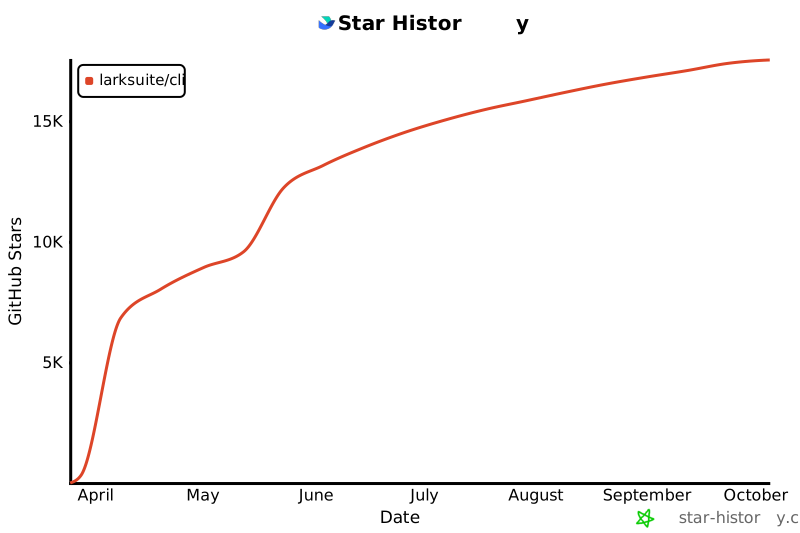](https://star-history.com/#larksuite/cli&Date)
|
|
|
|
## Contributing
|
|
|
|
Community contributions are welcome! If you find a bug or have feature suggestions, please submit an [Issue](https://github.com/larksuite/cli/issues) or [Pull Request](https://github.com/larksuite/cli/pulls).
|
|
|
|
For major changes, we recommend discussing with us first via an Issue.
|
|
|
|
Before opening a PR, see [AGENTS.md](./AGENTS.md) for the local build, test, and PR checklist used by contributors and AI agents.
|
|
|
|
## License
|
|
|
|
This project is licensed under the **MIT License**.
|
|
When running, it calls Lark/Feishu Open Platform APIs. To use these APIs, you must comply with the following agreements and privacy policies:
|
|
|
|
- [Feishu User Terms of Service](https://www.feishu.cn/terms)
|
|
- [Feishu Privacy Policy](https://www.feishu.cn/privacy)
|
|
- [Feishu Open Platform App Service Provider Security Management Specifications](https://open.feishu.cn/document/uAjLw4CM/uMzNwEjLzcDMx4yM3ATM/management-practice/app-service-provider-security-management-specifications)
|
|
- [Lark User Terms of Service](https://www.larksuite.com/user-terms-of-service)
|
|
- [Lark Privacy Policy](https://www.larksuite.com/privacy-policy)
|